BillsCheck.pk
Balochistan

QESCO Online Bill Check

Check your QESCO bill with a 14-digit reference number. View the current amount, due date and units, then print a duplicate bill in seconds.

100% FreeNo login neededPrint or save PDFInstant result

Check Your Bill Now

Printed on top of your physical bill.

QESCOQuetta Electric Supply Company

Your bill loads directly from the official billing system — no captcha or copy-paste needed.

Head office

Quetta

Districts served

6+

Helpline

081-9201533

Reference no.

14 digits

Check in seconds

Enter your reference number to load the current QESCO bill instantly.

Duplicate bill

Print a bank-accepted copy or save your bill as a PDF, free of charge.

Never miss due date

See the due date up front and skip the 10 percent late surcharge.

Quetta Electric Supply Company (QESCO) supplies electricity to 6 main districts in Balochistan, and every monthly bill goes online the moment it is issued. To open yours you need one thing: the 14-digit reference number printed on the top-left of any past bill. Type it into the box above and the current amount payable, due date, units consumed and billing month appear on screen. No login, no app, no queue at the Quetta office.

How to check your QESCO bill online by reference number

Checking a QESCO bill online takes three steps and under a minute.

  1. Find the 14-digit reference number on the top-left of a previous QESCO bill.
  2. Type that number into the reference box at the top of this page.
  3. Press check to load the current bill, then print it or save a PDF.

The reference number stays fixed every month, so note it once and you can pull each new bill without the paper copy. Lost the old bill entirely? The Quetta customer services centre reads the number back to you from your meter or CNIC.

QESCO duplicate bill: print or download a copy

Duplicate bills solve the most common problem: the paper copy never arrived, or you binned it. QESCO stores every past bill against your reference number, so the duplicate opens with the same number you use for the current month. Press the print button on the result card to get a bank-accepted copy, or save it as a PDF to keep on your phone. There is no charge for a QESCO duplicate bill.

What your QESCO bill includes

Bills from QESCO split the total into clear parts so you can see where each rupee goes.

  • Units consumed during the billing month, measured in kilowatt hours.
  • Cost of electricity charged against the tariff slab your usage falls into.
  • Fixed charges, meter rent and the PTV licence fee.
  • General sales tax, plus income tax above set thresholds.
  • Arrears carried forward and the monthly fuel price adjustment.

The due date sits beside the total. Miss it and QESCO adds a late payment surcharge, usually 10 percent of the current charges. That is why the bill prints a higher "payable after due date" figure.

QESCO unit rates and tariff slabs

Unit rates rise as monthly usage climbs, because QESCO charges by tariff slab. Protected domestic users who stay under 200 units for six straight months pay the lowest rate. The indicative residential slabs below apply across QESCO and every DISCO NEPRA regulates.

Monthly usageApproximate rate
1 to 100 units (protected)PKR 7.74 to 13.48 per unit
1 to 100 units (unprotected)PKR 23.59 per unit
101 to 200 unitsPKR 30.07 per unit
201 to 300 unitsPKR 34.26 per unit
301 to 400 unitsPKR 39.15 per unit
401 to 500 unitsPKR 41.36 per unit
501 to 600 unitsPKR 42.33 per unit
Above 700 unitsPKR 48.84 per unit

NEPRA revises these figures when it notifies a new schedule, so treat the table as a guide and read the exact per-unit rate printed on your own bill.

QESCO new connection and meter reading

New connections and meter issues run through the same QESCO network. Apply for a domestic or commercial connection at your divisional office with your CNIC, property documents and a test report from an approved contractor. Once the meter is installed, QESCO generates the first bill in the next billing cycle, and its reference number becomes your key for every online check afterwards. Spotting a reading that jumped without extra usage? Note your own meter reading and raise it before the due date.

QESCO coverage area and helpline

Coverage spans Balochistan, where QESCO runs the grid stations, feeders and billing for Quetta, Gwadar, Khuzdar, Zhob, Sibi and Loralai. The company handles new connections, load extension, meter faults and outage complaints across Balochistan. For an outage or a billing dispute, call the QESCO helpline on 081-9201533 or visit the divisional office in your city with your reference number.
How to pay your QESCO bill

Bank branch

Pay at any authorised bank counter with your reference number before the due date.

Mobile wallet

Use Easypaisa or JazzCash from your phone in under a minute.

Internet banking

Add QESCO as a biller in your bank app and pay online.

Keep the receipt

Save the confirmation until the next bill shows the amount cleared.

Reference number

Finding your reference number

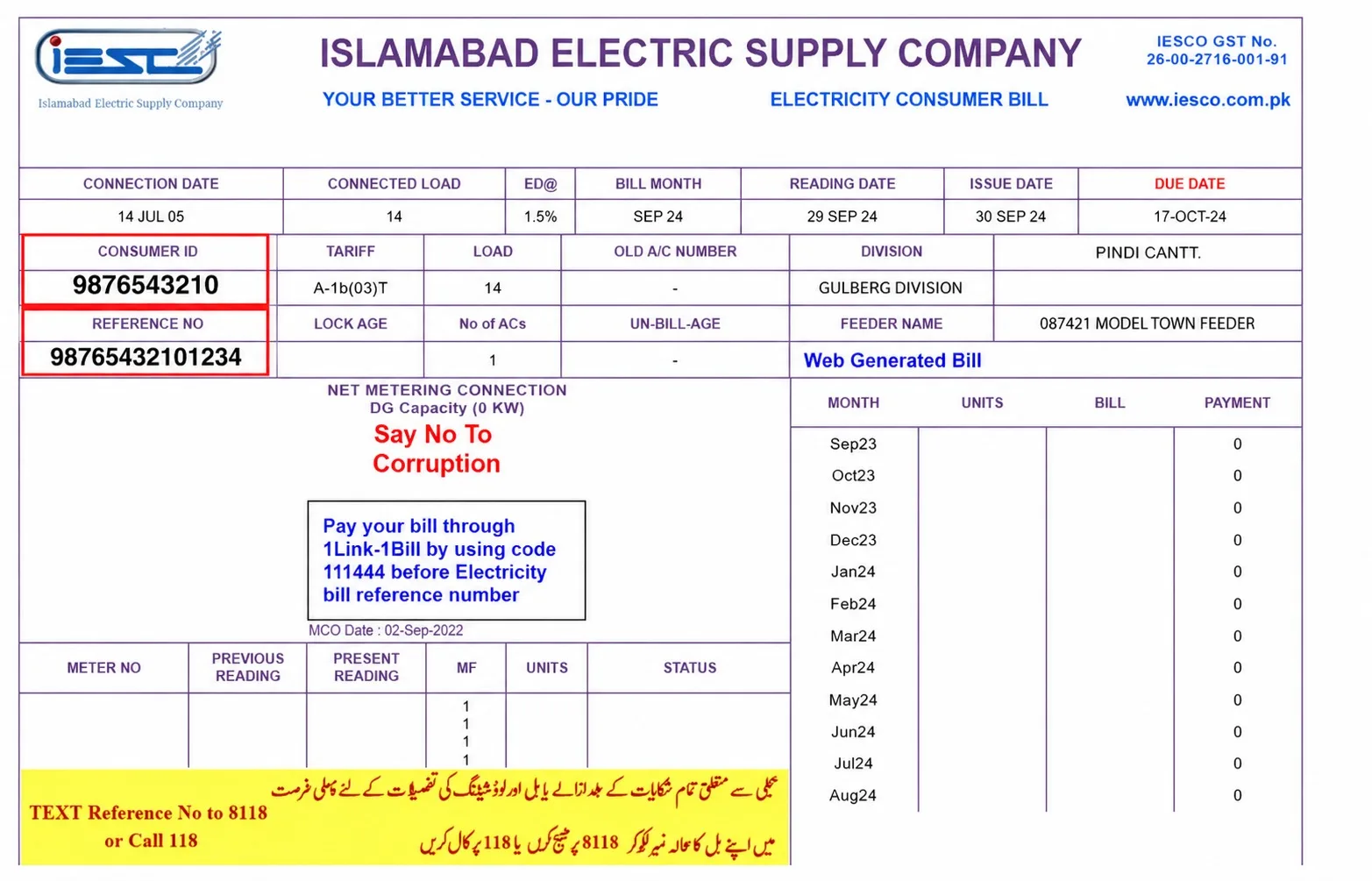
The reference number is a 14-digit code printed in the top-left corner of every QESCO bill, just under the company name and logo. It identifies your meter and connection, and it never changes, so you note it once and use it to open any current or past bill.

  • 1Look at the top-left block of a recent paper bill.
  • 2Read the 14 digits printed under the heading Reference No.
  • 3Ignore spaces, they are only there for readability.
  • 4Type the number into the bill checker above and press check.

Lost your bill? The customer services centre can read it back from your meter number or CNIC.

Sample QESCO bill showing the reference number in the top-left cornerReference No. is here

QESCO bill FAQs

Enter the 14-digit reference number from your QESCO bill into the box at the top of this page and press check. The current amount, due date and units load instantly, and you can print or download the bill as a PDF.

The reference number sits on the top-left corner of every QESCO bill and runs to 14 digits. It never changes, so once you note it you can open any current or past bill without the printed copy.

Enter your reference number, then press print or save on the result card to produce a QESCO duplicate bill. It is free, matches the original, and bank counters accept the printed copy for payment.

Yes, viewing and printing your QESCO bill costs nothing. You only pay the bill amount itself through a bank, a mobile wallet or the Quetta payment counter.

QESCO adds a late payment surcharge, usually 10 percent of the current charges, once the due date passes. The higher "payable after due date" amount already prints on the bill, so you see the penalty before you pay.

QESCO charges by tariff slab, so the per-unit rate rises as monthly usage grows. Protected users under 200 units for six straight months pay the lowest rate, while heavy users move into higher slabs set by NEPRA.

QESCO supplies Quetta, Gwadar, Khuzdar, Zhob, Sibi and Loralai across Balochistan. The company runs billing, new connections and outage response for every district of Balochistan inside its licence area.

Yes. Both Easypaisa and JazzCash accept QESCO bill payments against your reference number from the app or an agent shop. Internet banking and bank counters work the same way.

Call the QESCO helpline on 081-9201533 to report an outage or a billing error. For a formal correction, take your reference number and the disputed bill to the divisional office in Quetta.

Pay your QESCO bill online through internet or mobile banking by adding QESCO as a biller, or through Easypaisa and JazzCash by entering the reference number. Bank counters across Balochistan accept the printed bill too. Whichever channel you pick, the payment clears against the same reference number, so keep the receipt until the next bill shows it settled.

Apply for a new QESCO connection at the divisional office in Quetta or your local subdivision office. Take your CNIC, proof of property ownership or a tenancy agreement, and a wiring test report from an approved electrician. Once QESCO installs and tests the meter, the first bill is generated in the next billing cycle, and its 14-digit reference number becomes your key for every online check afterwards.

A protected consumer is a QESCO household that stays under 200 units a month for six consecutive months and so pays the lowest tariff rate. Cross that limit and the connection moves to unprotected rates, which are higher. Your bill shows your protected status, and watching your monthly units helps you keep it.

A higher QESCO bill usually comes from more units used, a jump into a higher tariff slab, or the monthly fuel price adjustment that NEPRA notifies. Compare this month's units against last month's on the bill to see which one moved. A sudden spike with no change in usage can mean an estimated or wrong reading, which the Quetta office can correct.

A QESCO bill adds general sales tax, a fixed meter rent, the PTV licence fee, and the fuel price adjustment on top of the cost of units. High-usage and commercial connections also carry income tax and further duties. Each line is printed separately on the bill, so you can see exactly what makes up the total.

To change the name on a QESCO connection, visit the divisional office in Quetta with the current owner's CNIC, the new owner's CNIC, proof of ownership transfer, and a recent paid bill. Once QESCO updates the record, future bills carry the new name against the same reference number.

Check other DISCO bills